> For the complete documentation index, see [llms.txt](https://docs.legitimate.tech/technical-docs/llms.txt). Markdown versions of documentation pages are available by appending `.md` to page URLs; this page is available as [Markdown](https://docs.legitimate.tech/technical-docs/protocol/customizations/locking-mechanism-options.md).
# Locking Mechanism Options
{% hint style="info" %}
Legitimate maps each unique digital ID to a token on a decentralized blockchain network. For simplicity and consistency, our documentation will refer to each digital ID as a token.
{% endhint %}
### Transfers
By default, transfers are disabled for locked tokens to prevent tokens from being traded when owners do not have possession of the physical item.
Although we do not recommend changing this, we offer the ability to [turn this functionality off](https://github.com/LegitimateTech/lgt-phygital-nft-v3/blob/main/contracts/LockedNFT/base/Locked721Base.sol#L19). This can only be set by [Access Control Roles](/technical-docs/protocol/smart-contracts/access-control-roles.md#default_admin_role)
### Service Status
When the activation period of a set of phygital products is over, the brand or creator can decide to turn off the locking mechanism and permanently unlock all tokens by setting the service status to false. This allows the token to be freely traded separately from the physical product without having to unlock.
Each contract managed by Legitimate contains a service status flag. When the service is active, the locking mechanism of the protocol will work as intended. When service is inactive, two things will happen:
1. `getTokenLock()` and `locked()` will always return `false`
2. Tokens will no longer auto-lock after transfer
Whether the service status is active or inactive is set [here](https://github.com/LegitimateTech/lgt-phygital-nft-v3/blob/main/contracts/LockedNFT/extensions/LGTServiced721Psi.sol#L15). This can only be set/changed by [Access Control Roles](/technical-docs/protocol/smart-contracts/access-control-roles.md#service_status_role)
### Token Recovery
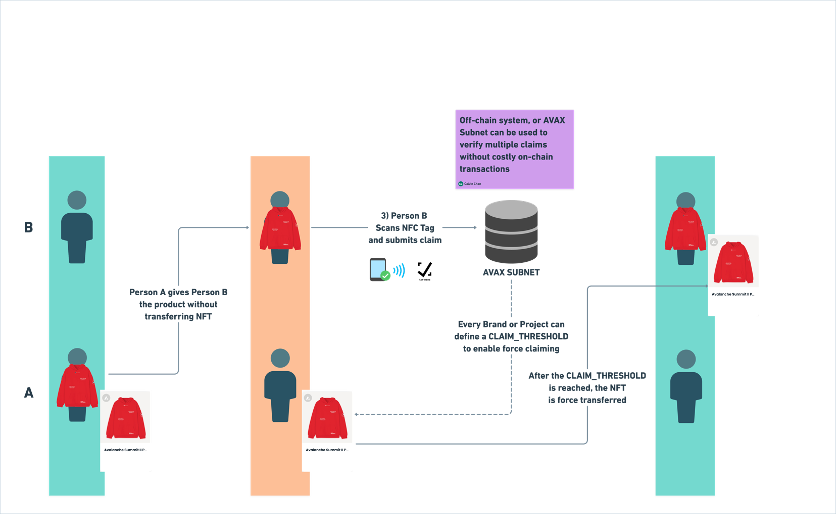
Legitimate can also define token recovery users to help brands reconcile ownership when a phygital product exchanges hands without the underlying token being transferred first. This is done via the [Access Control Roles](/technical-docs/protocol/smart-contracts/access-control-roles.md#token_recovery_role).
By default, Legitimate operates an off-chain token recovery mechanism that can help brands reset the ownership of their phygital products.
This role can also be granted to a smart contract that operates a decentralized consensus mechanism in conjunction with the ability to verify the NFC digital signatures. As such, this contract can request that the customer scan the unit a set number of times before force recovery is performed.
What a decentralized consensus recovery mechanism looks like
---
# Agent Instructions
This documentation is published with GitBook. GitBook is the documentation platform designed so that both humans and AI agents can read, navigate, and reason over technical content effectively. Learn more at gitbook.com.
## Querying This Documentation
If you need additional information that is not directly available in this page, you can query the documentation dynamically by asking a question.
Perform an HTTP GET request on the current page URL with the `ask` query parameter, and the optional `goal` query parameter:
```
GET https://docs.legitimate.tech/technical-docs/protocol/customizations/locking-mechanism-options.md?ask=&goal=
```
`ask` is the immediate question: it should be specific, self-contained, and written in natural language.
`goal` is optional and describes the broader end goal you are ultimately trying to accomplish on behalf of the user. GitBook uses it to tailor the answer towards what is most useful for that goal.
The response will contain a direct answer to the question and relevant excerpts and sources from the documentation.
Use this mechanism when the answer is not explicitly present in the current page, you need clarification or additional context, or you want to retrieve related documentation sections.